
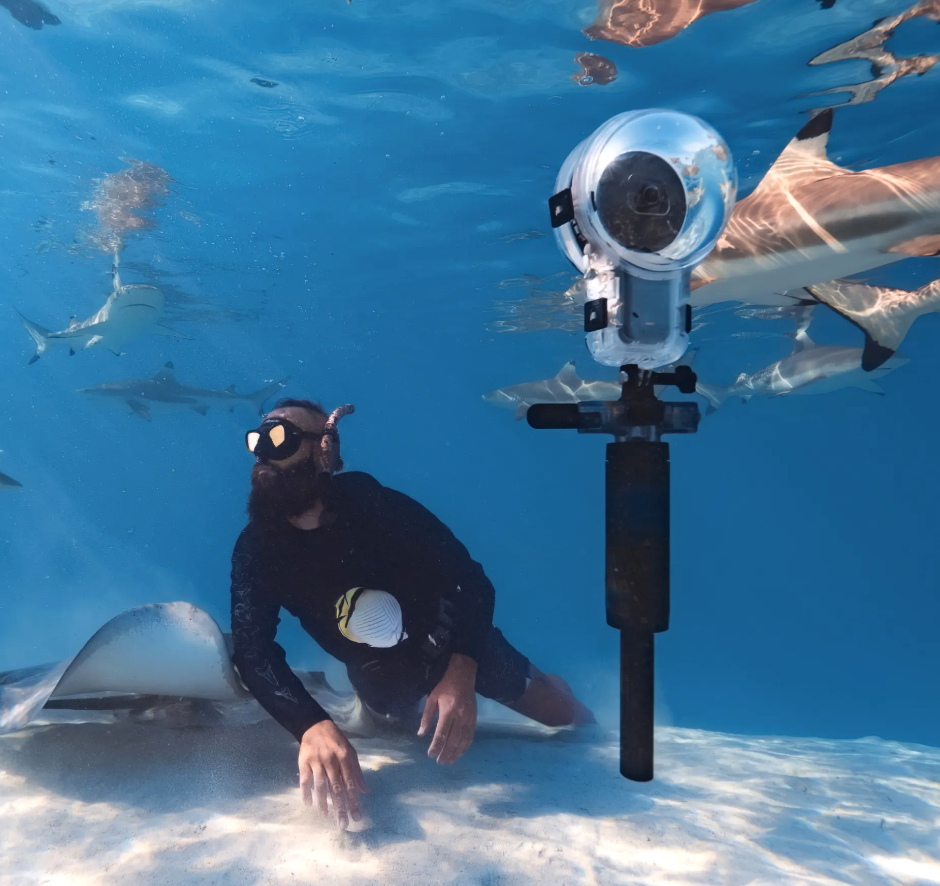
The combination of the new Insta360 X5 for snorkeling, with the new X5 Invisible Dive Case Pro, and the remarkable new Dive Buddy handle (that allows you to float the camera at a controlled depth), is such a unique set of tools for capturing fun and interesting videos, that we would strongly consider it before any other action camera. It’s great to see a camera company really focusing on the underwater world.
360 degree cameras take a bit to wrap your head around, in terms of how they work. We have a bit of experience using them while snorkeling and will try and clear it all up! For some snorkelers this set of tools could be amazing. But there are also some big downsides we talk about at the bottom of this page.
We tested an earlier version of the camera, the X2, with its underwater housing while snorkeling in Bonaire. And it was fun, but it had a few issues we did not like. The new system above not only solves nearly all those issues, but introduces so many cool new ways to get unique snorkeling videos that it makes us want to buy a setup again!
Product Links – Insta360 X5 for Snorkeling
Note: Our suggestions come from hands-on experience. We hope you find them helpful. You can help us if you purchase from the links below. We may make a small commission, as an Amazon Associate or from other companies, at no extra cost to you.
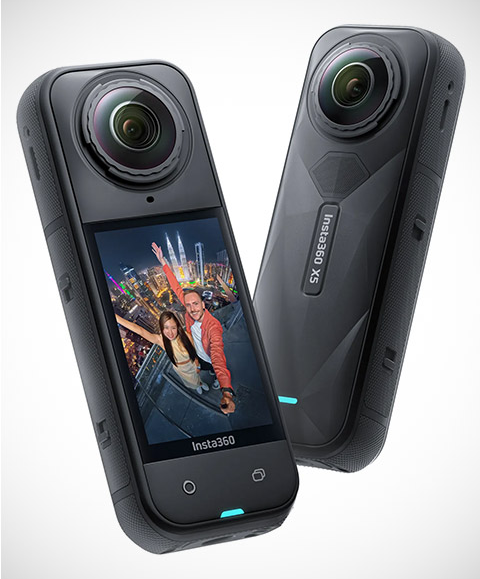
Below are all Amazon links to the products we will be talking about on this page:
Insta360 X5 Invisible Dive Case Pro
Insta360 X5 Invisible Dive Case
Insta360 Invisible Selfie Stick
We would we buy?
We would get this Insta360 X5 Essentials Bundle, which includes the camera, an extra battery, the quick charge battery station, the invisible selfie stick and a 1TB memory card, plus some more accessories. We would not get the regular dive case, but would instead buy the Dive Case Pro above, and we would also get the Dive Buddy above.
What Is a 360 Degree Video Camera?
The Insta360 X5 has two very wide angle lenses. One on the front, one on the back. It records with both at once, and using software, stitches the results into a full 360 degree view of the world around it.
Real estate folks use these cameras to make those weird virtual tours, where you can click to any spot in the home to see it, or even drag the image around. But 360 degree cameras have many other ways to use them, with some intriguing benefits to a snorkeler.
With 360 Cameras You Can Watch the World Not the Camera
What is really wonderful about using an Insta360 X5 for snorkeling is that because the camera records everything around it, you don’t have to carefully point the camera at a subject, making sure it is carefully framed in the camera screen. Because let’s face it, trying to see your tiny camera screen, in the bright light, and at odd angles, is sometimes nearly impossible.
Another advantage is that you don’t need to track a moving subject. Got a big fast shark or jack darting by? It’s really hard to track those with a camera. With the 360 camera you don’t need to. Just hold the camera out there on a selfie stick or handle and it will capture that creature swimming by easily. You can also use the new amazing Dive Buddy handle (more about it below) and float the camera in the water column, or set it down on some sand. Then just swim off a ways, and watch all the fish return to the area, and even swim around the camera out of interest.
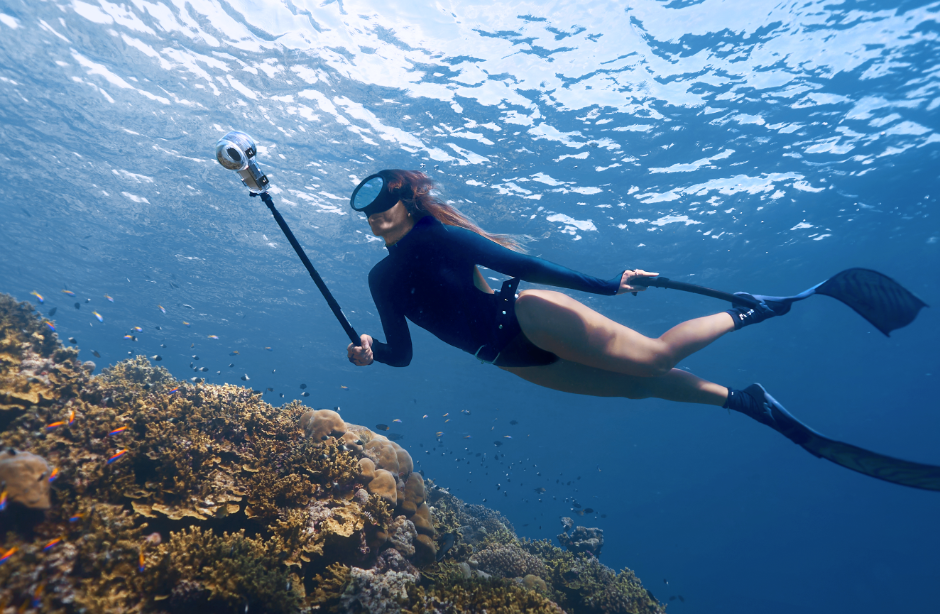

Besides making it easier to capture good videos, the other big benefit is that you can enjoy watching the action with your own eyes, instead of paying attention to your camera screen. So long as you have the camera in place and on, it does not matter what direction you have it pointed. This is a really big benefit of 360 degree cameras; more enjoyable snorkeling.
If you like getting selfie videos underwater, these cameras are great. If you use the right type of selfie stick, the software will completely remove it from the footage. So it will look like the camera is sort of floating out in front of you in the video.
These cameras also have incredible vibration reduction, so you don’t even need to be particularly careful about how steady you hold things. You don’t need to keep the horizon straight either. It is all easily fixed because you have a 360 degree view to work with when editing.
The Insta360 X5 and its editing software also do an amazing job capturing accurate colors underwater. When editing you have four different underwater white balance settings to choose from, depending on what looks best.
Note that you don’t have to always use the camera in 360 degree mode. You can also use a single lens, as though it is a normal action camera, if you know that you won’t need a wider view.
You Edit What You Want to Share Later
After taking your video it is not ready to share or enjoy. You need to either edit your video on your phone, with the Insta360 app, or on your home computer. It’s during the editing process where you select what parts of that 360 degree world you want to show in your final video. This process is called reframing. Normally that means zooming and cropping in to a tighter, more normal frame size or field of view.
In the editing process you can choose to follow a subject as it moves around you or the camera, as though you had tracked its motion when you first took the video. Without having moved the camera, in the final video you can look down at a reef below the camera, slowly pan up to a big fish coming by, follow it around you, and then pan over to look at a fellow snorkeler, or yourself. You can even reframe several different views from the same moment in time to share. The newest software makes editing these videos much easier, with subject tracking, so you don’t have to manually make edits to follow some particular subject.
In your final video, you can not only pan around, using a standard field of view, but you can also expand or contract your field of view greatly, zooming out to view a very wide angle scene, and then zooming in to look closer at a fish. You can even jump back and forth between subjects that are in front of and behind the camera. You can also get very creative with the highly unique perspectives possible from the 360 degree perspective.
Watch the video below that we made with the older X2, from a trip to Bonaire. We mostly kept the footage still, because that older camera and housing gave pretty unsharp footage at the edges where it was blending the two lenses together. But at around the two minute mark you will see how we start to pan the view of the camera around. That is done in software later at home. We never actually moved the camera. We were not even careful about which direction the camera was pointed when we placed it on the sand on a mini tripod.
With the new X5 camera and pro housing, from what we have seen it provides sharper results than our old camera, so we could see integrating a lot more movement and tracking into our final videos.
The next video below does a good job of showing you the differences between the regular Invisible Dive Case and the Invisible Dive Case Pro. It also shows you the general process of using the camera underwater and the editing process.
Hey, if you are finding this page useful, you will love our free monthly snorkeling newsletter. We almost always have a camera or photography tip in it.
New X5 Invisible Dive Case Pro

When using an Insta360 X5 for snorkeling, the new Invisible Dive Case Pro (on Amazon) is a must have for two reasons. First, the domes are much larger, and made of a better optical quality plastic, which give sharper videos all around, with less sun flares. It also helps the camera to do a better job of stitching the two sides of the video together.
The large dome is also desirable because it makes it much easier to get those cool over/under videos. That is when the camera is partly out of the water, and partly under, and you can see the land and boats above the water and the underwater world also. The larger the dome, the easier it is to get those videos.
Being physically larger means it is a bit more cumbersome to deal with, but in our minds it is worth the larger size and cost.
Be careful when ordering one of these. There are off-brand knockoffs, that are not of equal quality, and it is hard to tell if they are made by Insta360 or not. Use our link above, which goes to Insta360’s direct store on Amazon.
Yes, the X5 is already waterproof enough to take underwater. But the lenses need the air gap and dome optics to do a good job underwater.
New Dive Buddy Buoyancy Control Handle
The new Insta360 Dive Buddy (on Amazon) is an incredible tool to use with an Insta360 X5 for snorkeling. It is a handle you attach to the bottom of your housing. It allows you to float your Insta360 at a controlled depth, and let go of it. There is a little fin you fold out when you do this that keeps it from spinning. Then you can swim off, and let fish swim around it, or stay in the area and film yourself.
We think this is a rather remarkable tool for getting amazing videos of fish and reefs. It is much better than sitting it down on a surface on a tripod. Although the new Dive Buddy also has some tripod feet, if you have sand available.
How it works is dang hard to understand, and we could only find one resource that explained it. Before you get in the water you adjust how many weights are inside. Then in the water, you can screw the handle up or down, and that somehow changes the compressed air volume inside the handle, making the camera neutrally buoyant at almost any depth.
You can also attach the selfie stick to the bottom of the Dive Buddy handle.
The Dive Case Pro comes with an extra weight, to offset its increased buoyancy. In the video above, it appears they are attaching that weight to the bottom of the Dive Buddy.
The Insta360 Invisible Selfie Stick
It is really nice to be able to stick the camera out away from you when underwater. It places the camera closer to the fish and reef, and away from you. Then the software can remove the stick from the footage, making it look like someone else is filming you. But in order for the software to be able to remove the selfie stick, no parts of it can be sticking out under the camera. So, many selfie sticks will not work.
We found that the Insta360 Invisible Selfie Stick (on Amazon) worked very well underwater. So we would stick with that. You could buy another brand, just make sure it does not have any little knobs that stick out the side, that could be seen by the super wide angle lenses.
X5 Improvements

The X5 has so many improvements over the older X2 that we used, that they are hardly comparable.
But probably the biggest one is that the image quality is much better. That was one of the problems we had with the older X2. When you would reframe your video, zooming in a bit, the image quality would really drop.
But the X5 has two major updates that fix that. First, the sensor size is much larger. The X5 has dual 1.28″ sensors. That is 144% larger than the X4 had, which in turn had larger sensors than our old X2.
The other big change is that the X5 can shoot in 8K video. For a regular video camera 8K is overkill, and is essentially a dead format. But for a 360 degree camera 8K is really good to have because the majority of the time your are cropping and using much less of the total available resolution. So you might end up with a really crisp 4K video after reframing.
Because of those big sensors, and some new AI features, the new X5 has some amazing low light capabilities. The thing can practically see in the dark. It would be great for taking videos in caves, if you don’t have lights.
The new X5 also has user replaceable lenses, that are very affordable, which is excellent. Those lenses really protrude beyond the camera body, and can be scratched easily.
It also has much better battery performance compared to all earlier versions.
Another nice feature is microphones that are more wind-resistant. That is very helpful for taking videos on a windy boat.
360 Cameras Are Excellent Above the Water!
The X5 is a great tool for recording some of your travel adventures above the water as well. You can extend it up above you on a long selfie stick while on a liveaboard or snorkel boat, and the recording will almost look as though you are using a drone following along with you, because it will remove the stick.
The X5 is very waterproof, even without a housing, so you don’t have to worry about ruining it getting topside videos around the water. The same benefit as underwater, of not having to watch your camera screen, is also great topsides. For example, if you are hiking up to a beautiful view point on some Indonesian island, you can watch your step, not the camera. Insta360 makes a bunch of different selfie sticks for different uses to help with this.
Although it is not from a snorkeling trip, the video below illustrates this well. Galen used the X2 on a multi-day dinghy cruising trip in the San Juan Islands, in a boat he built. It is a crazy long video. But it shows some of the capabilities of these cameras for creative storytelling.
Note that in the boat he is not holding or controlling the camera, and is hands free to do other things. Any change of perspective or perceived motion of the camera is all done in the editing process after the trip. The same goes for when he is walking around the island. He just stuck the camera up in the air on a selfie stick, and rested it on his shoulder.
Even if you don’t watch the entire video, fast forward to about 12:10, to see one of the really interesting perspectives that 360 cameras can provide called “Tiny World”. You would not want to overuse these warped perspectives, but they can sometimes be interesting and effective.
Downsides of Insta360 X5 for Snorkeling Adventures
There are great advantages to these cameras, over a normal action camera. But there are also some big downsides to using an Insta360 X5 for snorkeling.
File Sizes Are Huge – You Can’t Just Take Video the Entire Time
Recording 360 degree footage in high resolution 8K video creates massive files. So you will need big memory cards in the camera and your phone, and a big hard drive on your computer.
Because of the large file sizes, you are not going to want to turn the camera on and leave it on for your entire snorkel. You still need to have intention behind what you record. And it is best to keep the videos as short as possible. Then, later in the editing process you will put together all those little videos into a longer movie of your snorkel or trip.
High Power Computer or Phone Needed for Editing
Editing big high resolution video files often requires a fairly high powered computer or phone, with special video cards, and tons of ram and memory. So you must figure that into this process. This is particularly true when you start putting together many shorter videos into one larger one, with music and text.
Video Editing Time and Learning
This is the biggest downside for us. 360 videos require you to select every viewing angle, pan speed, and to make many other choices, before they can be shared in a way that is enjoyable to watch. Video editing is already a very time consuming and skilled process, and editing 360 degree footage adds in another layer of skill and lots of time.
The software Insta360 provides makes it all pretty easy and intuitive, and there are some new AI tools to help streamline some aspects of it. But don’t underestimate how much time is required to get good results. But if you love creating videos, it is probably worth it! And it is worth keeping in mind that you put in less effort trying to get perfect results in the water, and enjoy yourself more while snorkeling, and then you put in more time later, editing at your leisure.
Does Not Focus Close
The X5’s minimum focus distance is two feet. That is not great at all for getting close to small cool creatures like nudibranchs. Even fish can’t be too close, or they will be out of focus. The X5 is better for ambience type videos, big reef scenes, clouds of fish, and selfies of yourself and other friends snorkeling, and topside travel storytelling.
Not Great for Pictures
The X5 is designed for 360 degree video. It can also take pictures. You can even grab decent quality screen shots out of any video. But the image quality is not going to be fantastic, and the edge sharpness is not going to be very good. The close focusing issue mentioned above will prevent you from taking any macro shots. If you want great pictures, this is not the right camera. The pictures it takes above the water are better.
Fun, Creative, But Not Professional Results
We think this is a great set of tools for creating really fun snorkeling and travel videos, that give you a ton of opportunity for being creative. And because you don’t have to focus on the camera screen as much, we think it can really improve your snorkeling experience. But ultimately this is not a professional underwater video tool. The edge to edge sharpness leaves much to be desired. Mostly it is sharp in the center, and soft around the edges. And there will be artifacts from the stitching process, and sun flares will happen. But for creating really enjoyable, colorful, travel memories, it is an astounding set of tools.